Ask Ugo
Ugo, Give River's mascot, can answer your questions about Give River and how to use the app. Ask in your own words, the way you'd ask a teammate.
Ask from the Help Center
- Open the Help Center (in the Settings menu: the gear at the bottom of the side menu, or your photo in the top-right corner on a phone).
- Type in the How can I help? box at the top. Matching articles show up as you type; tap one to open it.
- For an answer in plain words, tap Ask Ugo.
Ugo gives a short answer from the articles in this Help Center, with links to the articles it used, so you can read more.
Ask from any page (computer or tablet)
On a computer or tablet, a round Help & Support button sits in the bottom-right corner of the screen.
- Tap it to open the help panel (How can I help?).
- Type your question in the Ask any question box and tap Ask Ugo.
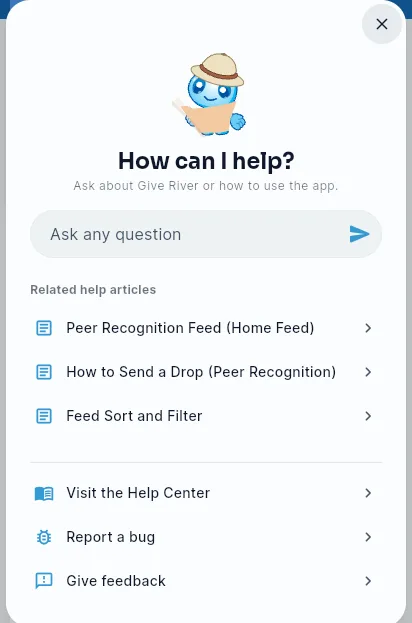
The panel also lists Related help articles for the page you're on, and Ugo leans toward those topics when it answers. From the same panel you can:
- Visit the Help Center,
- Report a bug or Give feedback (see Report Bugs and Feedback),
- Take the app tour again (see The App Tour). Admins also see Take the admin tour, which opens the admin dashboard and replays the admin tour.
The button is hidden while you're in a chat conversation, where it would cover the Send button. Open the conversation list or any other page to bring it back.
Ask Ugo to pick River Runs
In River Runs, the search box on Discover All Runs has an Ask Ugo pill. Tap it, describe what you'd like to learn ("What kind of Run are you looking for?"), and Ugo suggests runs for you. Tap the pill again to go back to keyword search. See River Run Library.
How good are the answers?
Ugo answers from the Help Center rather than guessing, which is why it sometimes points you to an article instead of (or as well as) a direct answer. Answers are written automatically and can occasionally be wrong or out of date, so check the linked article when it matters.
Still stuck?
- Browse the Help Center articles for step-by-step guides.
- Email the Give River team at support@giveriver.com, or choose Contact us in the Settings menu.
- Admins also see a Book a call card in the Help Center, to talk with the Give River team.
Ugo also pops up on its own to celebrate things like drops you've earned or a badge. See Ugo, Give River's Mascot.
Did this article help?
Related articles.
See the platform in action.
Free for up to 25 members, or try Core or Growth free for 30 days. A card is required; Free is never charged, and a trial bills when it ends unless you cancel.