Appearance — Themes, Typefaces & Icons
Give River lets you change how the app looks without changing how it works. You can pick a color theme, a typeface, and an icon style, and mix them freely — your choices are saved to your device and apply everywhere in the app.
Opening Appearance
- Click the gear at the bottom of the side menu (on a phone, tap your photo in the top-right corner) and choose Settings.
- Scroll down to Appearance. On a computer, you can also click Appearance in the list on the left.
Appearance shows Mode and Theme. Typeface and Icons are under More options: tap it to show them, and tap Fewer options to fold them away again. If you've already picked a typeface or an icon set of your own, they're shown straight away. On a computer the themes and typefaces sit side by side; on a phone they're in one list.
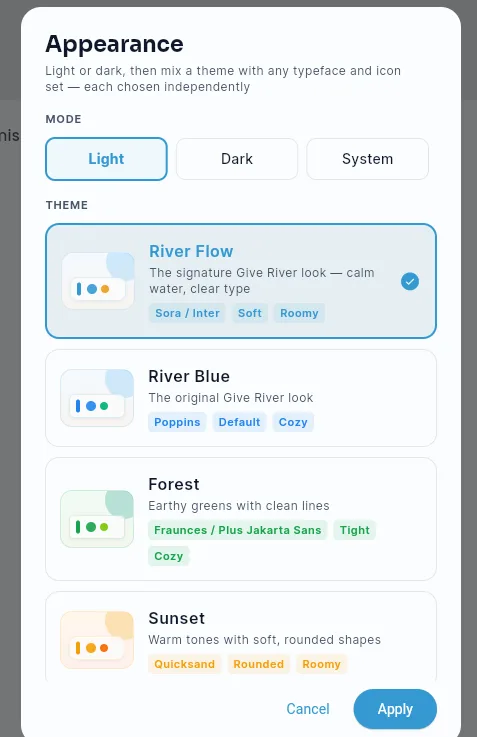
Mode
Choose Light, Dark, or System. System follows whatever your device is set to and switches automatically.
Theme
A theme sets the app's color palette, corner roundness, and spacing, plus a recommended typeface and icon style to match.
| Theme | Look |
|---|---|
| River Flow | The signature Give River look — flowing, layered water with calm blues. This is the default |
| River Blue | Crisp corporate blue — deep navy and cobalt, a clean white page, and flat cards with a fine border |
| Forest | Earthy greens with clean lines and tighter corners |
| Sunset | Deep ambers and rose with soft, rounded shapes |
| Slate | Minimal, geometric, and precise |
Every theme works in both light and dark mode, so your Mode choice and your Theme choice are independent. In dark mode each theme keeps a hint of its own color, and buttons, tabs, and banners follow the theme you pick.
Typeface
Under More options, choose Theme default to use the font each theme was designed with, or pick any typeface from the list to override it. The override sticks even if you switch themes, so you can pair any font with any palette.
Icons
Under More options, choose the icon family the app draws with.
| Set | Look |
|---|---|
| Phosphor | Clean, even weight with softly rounded terminals |
| Classic | The standard Material icons |
Theme default uses whichever set the current theme was designed around — so switching themes also switches icons. Picking a set explicitly keeps that set no matter which theme you choose.
Each option shows real icons from the app, so you can compare the sets at a glance.
A few marks — the drop, the token, the star, and the filled heart — are part of the Give River brand and look the same in every set.
Saving and going back
There's no Save button: each choice takes effect across the whole app as soon as you tap it, and is saved on this device. To go back, tap the option you had before.
Nothing here affects your drops, posts, or notifications — appearance settings are local to you and are not visible to your team.
Did this article help?
Related articles.
See the platform in action.
Free for up to 25 members, or try Core or Growth free for 30 days. A card is required; Free is never charged, and a trial bills when it ends unless you cancel.