Microsoft Praise Alternatives: 6 Teams Recognition Apps Compared
Microsoft Praise is a quick, built-in way to thank coworkers in Teams, included with most Microsoft 365 plans. If you want recognition tied to your values, rewards, leaderboards or company-wide reporting, here are six Teams apps compared: Give River, Bonusly, Matter, HeyTaco, Kudos and Nectar.

The short answer: Microsoft Praise is the built-in way to thank coworkers in Microsoft Teams: it's included at no extra cost with most Microsoft 365 plans, it's on by default, and for a quick thank-you it works well. Teams look for an alternative when they want recognition tied to their own company values, a reason to keep it going (leaderboards, challenges, gamified Seasons), rewards such as gift cards, or reporting across the organization. Give River covers all four on its Core plan, with recognition given from inside Teams; Bonusly, Matter, HeyTaco, Kudos and Nectar also work in Teams, each with a different trade-off.
Microsoft facts are from Microsoft's own documentation (read November 12, 2026); competitor facts are from each vendor's own site (October and November 2026). We make Give River, so it's first, and we say where it doesn't win.
What Microsoft Praise does well
Praise is a Teams messaging extension. You open it from the compose box in a chat or channel (+, then Praise) or from the Viva Insights app, and Microsoft enables it by default for every Teams user.
- Fast to send. Praise up to 10 people on one card, pick one of 14 preset titles such as Courage, Optimism and Kind heart, and add an optional note of up to 500 characters.
- Private or public. Send it in a 1:1 chat, or post it in a Teams channel where every member can see it.
- Nudges and history. Viva Insights adds recurring reminders on the days and time you choose, a six-month history of praise sent and received, and suggestions of whom to praise.
- No extra cost on most plans. It's included with most Microsoft 365 and Office 365 business, enterprise and frontline plans. Only "praise trends", a personal view of your praise activity, needs a paid Viva Insights subscription.
- On your phone. It works in the Teams mobile app, under More options next to the compose box.
If your team wants a quick, sincere thank-you in Teams and nothing more, Praise may be all you need.
Why teams look for a Praise alternative
Praise is a thank-you card, not a recognition program. Here's what Microsoft's documentation doesn't describe:
- Your own company values. Praise offers 14 preset titles, and Microsoft's current admin documentation doesn't describe a way to add your own.
- Points, rewards or gift cards. Microsoft's documentation doesn't describe any of them in Praise.
- A reason to keep going. Microsoft's documentation doesn't describe leaderboards; the habit rests on personal reminders.
- Reporting across the organization. Praise trends are personal ("Only you can see this information"), and Microsoft's documentation doesn't describe organization-wide praise reporting for managers or HR.
- Program settings. Microsoft documents one admin control: Praise on or off, for everyone or for specific users.
Microsoft Praise alternatives at a glance
| App | In Teams | Free or trial | Paid pricing | Program features |
|---|---|---|---|---|
| Microsoft Praise (baseline) | Built in, on by default | Included with most Microsoft 365 plans | Praise trends need a paid Viva Insights subscription | 14 preset titles; Microsoft's docs don't describe points, rewards or leaderboards |
| Give River | Core and Growth, with Slack | Free for up to 25 members (web and mobile); 30-day Core trial | Core $4.99/user/mo | Custom values, River Rankings, Seasons; gift cards on Core |
| Bonusly | Every plan | Free for up to 8 users | Team $3/user/mo ($5 with Bizy AI) | Points tied to values; 1,200+ rewards; leaderboards on Organization plan |
| Matter | Every plan | Free, unlimited users | Basic $1/user/mo; Pro $3 (billed annually) | Custom values from Basic; coins and rewards from Pro |
| HeyTaco | Yes (Quests are Slack-only) | 30-day trial; no free plan | Classic $3/user/mo; Deluxe $5 | Taco Shop rewards, leaderboards; gift cards on Deluxe |
| Kudos | Yes, plus Outlook | Not listed; demo | Its blog gives $2–$5/user/mo | Values, challenges, leaderboards, rewards catalog |
| Nectar | Yes | Not listed; demo | Custom quote | Values, challenges, leaderboards, rewards catalog |
"Not listed" means we couldn't find it on the vendor's site, not that it can't exist.

1. Give River
Best for: teams that want recognition tied to their values, with a game and rewards attached, inside Microsoft Teams and Slack.
Pricing and Teams: Microsoft Teams and Slack are on Core, at $4.99 per user per month, with a 30-day trial (a card is required). The Free plan, for up to 25 members, runs on the web and the iOS and Android apps, without Teams or Slack.
What it adds over Praise:
- Recognition tied to your values. People send Drops, Give River's peer recognition, tagged with your own core values.
- A reason to keep going. The River Rankings leaderboard and gamified Seasons: 1–3 month cycles with a clear start, finish and reset (one at a time on Free, unlimited on Core). Customers average 90% adoption, per our FAQ.
- Rewards. On Core, Drops redeem for gift cards from a global catalog, and you can create custom awards.
- A view across the organization. Surveys and polls (including eNPS) and the Insights dashboard, on Core.
- More than recognition. Badges and milestones such as work anniversaries, plus River Runs micro-learning (5–20 minutes) on Core.
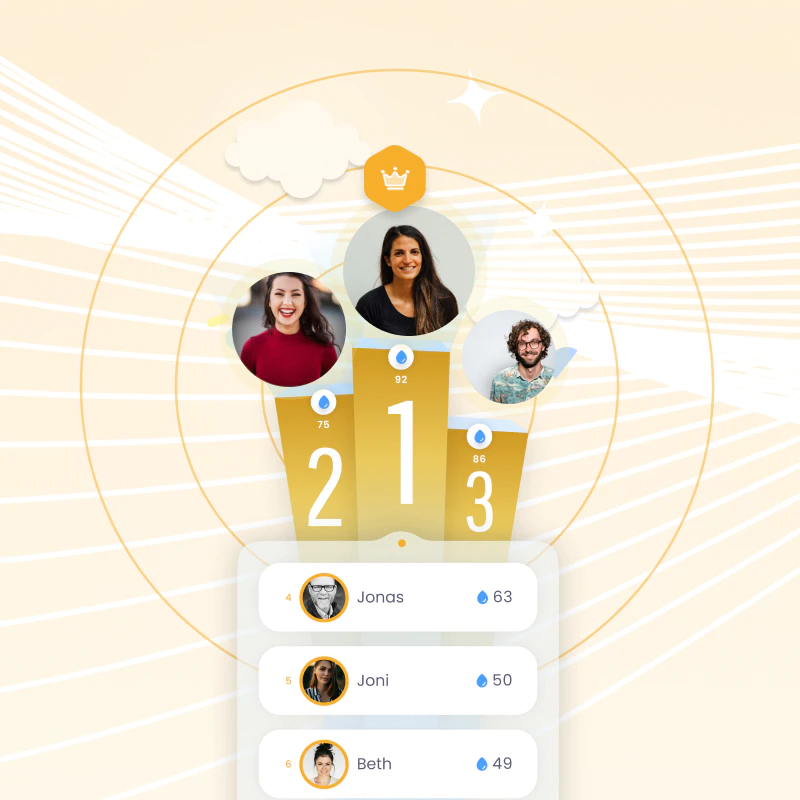
In Teams: people give Drops from the same + menu in a chat or channel: choose teammates, write a message, pick the values and how many Drops, and mark it private if it's just between the two of them. See Using Give River in Microsoft Teams.
Where Praise is stronger: it's already on, at no extra cost on most Microsoft 365 plans, while Give River's Teams integration is a paid Core feature.
2. Bonusly
Best for: points and a very large rewards catalog, with Teams on every plan.
Pricing: free for up to 8 users, per its help center. The Team plan is $3 per user per month, or $5 with its Bizy AI assistant, with a 30-day trial; Organization is custom-priced.
What it adds over Praise: points tied to company values; 1,200+ rewards, including cash-out options such as PayPal and Venmo; goals, 1:1s and AI-written performance recaps. It also works in Slack and Google Chat, with iOS and Android apps.
Trade-off: leaderboards are on the custom-priced Organization plan. See Give River vs Bonusly.
3. Matter
Best for: the lowest-cost step up from Praise.
Pricing: a Free plan ("free forever", unlimited users) after a 14-day trial. Basic is $1 per user per month billed annually ($2 monthly) and adds custom kudos, such as your company values. Coins and rewards start on Pro, at $3 billed annually ($4 monthly).
In Teams: Matter runs inside Slack and Microsoft Teams, Free included, with Feedback Friday prompts. It doesn't list a native mobile app.
Trade-off: Free sends kudos from default templates, without custom kudos, coins, rewards, dashboards or surveys, so most reasons to switch from Praise start on Basic and Pro.
4. HeyTaco
Best for: playful, low-cost recognition with a rewards shop.
Pricing: no free plan. A 30-day trial, then Classic at $3 per user per month billed monthly, or Deluxe at $5.
What it adds over Praise: tacos as a recognition currency, a custom Taco Shop of rewards on every plan, leaderboards and levels, and gift cards on Deluxe. It integrates with Slack and Microsoft Teams; its Quests feature is Slack-only.
5. Kudos
Best for: recognition-first programs with formal awards, service milestones and a large rewards catalog.
Pricing: no pricing page. Kudos sells through demos, and its own blog puts pricing at $2–$5 per user per month.
What it adds over Praise: recognition tied to company values; challenges, badges and leaderboards; gift cards, merchandise and travel rewards; pulse surveys with eNPS; and service awards. It works in Teams, Slack (not Enterprise Grid) and Outlook, with iOS and Android apps.
Trade-off: Kudos recommends a 6–8 week rollout, and its expert-guided campaigns are an add-on. See Give River vs Kudos.
6. Nectar
Best for: recognition plus internal communications and engagement surveys, including for frontline staff.
Pricing: custom quotes per employee per month, sold in bundles from Recognize alone to Nectar One. Its standard terms renew yearly with a 6% increase at each renewal.
What it adds over Praise: recognition tied to company values, challenges and leaderboards, a rewards catalog (gift cards, Amazon, swag, custom rewards), surveys with eNPS and benchmarks, and kiosk mode for frontline staff. It works in Slack and Teams, with iOS and Android apps. See Give River vs Nectar.
Other apps with Teams caveats
WorkTango's Teams bot is an optional add-on. Culture Amp works in Slack or Teams, but only one at a time. GoProfiles gives Bravos in Slack and only sends notifications to Teams. Workhuman's Teams app requires single sign-on. For a wider list, see the best Microsoft Teams apps for employee recognition and recognition platforms for Teams and Slack.
How to choose
- Decide whether you need more than a thank-you. If preset titles and a short note cover it, keep Praise. It's already on.
- Make sure recognition can carry your values. Give River, Bonusly, Kudos and Nectar tie recognition to your company values; Matter does from Basic.
- Decide how you'll keep it going. Give River has River Rankings and gamified Seasons on every plan; Kudos and Nectar list challenges and leaderboards; HeyTaco has leaderboards; Bonusly's are on Organization.
- Check the rewards. Gift cards come with Give River Core and HeyTaco Deluxe; Matter's rewards start on Pro; Bonusly, Kudos and Nectar run rewards catalogs.
- Compare how you buy. Give River, Bonusly, Matter and HeyTaco publish per-user prices. Kudos and Nectar quote after a demo.
Transparent pricing, no surprises. Give River publishes every price: Free for up to 25 members, Core at $4.99 per user per month, and Growth at $8.99. One price covers recognition, rewards, micro-learning, gamified Seasons, and surveys, with no hidden upcharges or fees, no long-term contract, and no price that climbs once you're using it. See pricing.
Frequently asked questions
Is Microsoft Praise free?
It's included at no extra cost with most Microsoft 365 and Office 365 business, enterprise and frontline plans, and it's on by default for Teams users. Praise trends, a personal view of your praise activity, need a paid Viva Insights subscription.
Can Microsoft Praise give rewards or gift cards?
Microsoft's documentation doesn't describe points, rewards or gift cards in Praise; a card holds a title, an optional note and a background color. Give River (gift cards on Core), Bonusly, Matter (from Pro), HeyTaco, Kudos and Nectar all offer rewards and work in Teams.
What's the best free alternative to Microsoft Praise?
Matter's Free plan works inside Teams, with unlimited users and default kudos templates. Bonusly is free for up to 8 users. Give River Free, for up to 25 members, adds custom values, River Rankings and a gamified Season on the web and mobile apps; Teams starts on Core.
Does Give River work in Microsoft Teams?
Yes, on Core ($4.99 per user per month, with a 30-day trial) and Growth, together with Slack. People give Drops from the + menu in any chat or channel, tagged with your company values. An admin connects it with a Team ID and integration key from Give River; nothing is needed from Azure.
Can we keep Praise and add a recognition app?
Yes. Praise stays on for Teams users unless an admin blocks it in the Teams admin center, so people can keep sending quick thank-yous while a recognition app handles values, rewards and leaderboards.
Sources
Microsoft facts from Microsoft's own support and Learn pages, read on November 12, 2026. Competitor facts from each vendor's own website and help center: Bonusly, Nectar and Workhuman checked October 4, 2026; Kudos, WorkTango and Culture Amp October 5, 2026; Matter, HeyTaco, GoProfiles and Bonusly's free plan November 2, 2026. Give River facts are from our pricing page, facts page and Help Center.
- Microsoft: Praise in Viva Insights, send praise in Teams, manage the Praise app, Viva service description (plans), Viva Insights requirements
- Bonusly: pricing, plans, integrations, rewards, leaderboard, goals, 1:1 meetings
- Matter: pricing, what each plan includes, kudos guide
- HeyTaco: pricing, how it works, Quests
- Kudos: pricing (Kudos blog), employee recognition, incentives and challenges, rewards, service awards, pulse surveys, integrations, expert-guided campaigns, product overview (rollout)
- Nectar: pricing bundles, subscription agreement, integrations, challenges, Engage, FAQ, mobile app
- WorkTango: Microsoft Teams integration
- Culture Amp: app for Slack or Microsoft Teams
- GoProfiles: Slack app, Teams listing
- Workhuman: Microsoft Teams integration
More from this category.

5 Awardco Alternatives in 2026, Compared by Price and Fit
The right Awardco alternative depends on how you want to reward people and how you want to pay for it. Give River, Bonusly, Motivosity, WorkTango, and Workhuman compared by reward options, fees, and fit.

Best Microsoft Teams Apps for Employee Recognition in 2026
The best Microsoft Teams recognition apps let people thank each other without leaving Teams, tie each shout-out to a company value, and add rewards or a leaderboard. We compare Give River, Bonusly, Matter, HeyTaco, Kudos, WorkTango and Culture Amp, with Microsoft's built-in Praise as the baseline.

Best Slack Apps for Employee Recognition in 2026
The best Slack recognition apps let people thank each other without leaving Slack, tie each shout-out to a company value, and give the team a reason to keep going. We compare Give River, Bonusly, Matter, HeyTaco, GoProfiles, Kudos, Nectar and WorkTango from each vendor's own site.
See the platform in action.
Free for up to 25 members, or try Core or Growth free for 30 days. A card is required; Free is never charged, and a trial bills when it ends unless you cancel.