River Run: Overview and Getting Started
A River Run is a structured micro-learning course inside Give River. Each River Run is made up of individual Streams — short lessons delivered as video, audio, text, images, or interactive content. You work through Streams in sequence, earning Drops (Give River's reward currency) as you complete each one.
What Is a River Run?
A River Run is a structured micro-learning course inside Give River. Each River Run is made up of individual Streams — short lessons delivered as video, audio, text, images, or interactive content. You work through Streams in sequence, earning Drops (Give River's reward currency) as you complete each one.
River Runs cover topics chosen by your organization, such as leadership, wellness, culture, or professional skills. Your admin enables River Runs for your workspace, and the content available to you depends on what your team has published or curated.
Before You Start: Consent
The first time you open River Runs, Give River asks you to agree to the River Runs terms and conditions. You only need to do this once. See River Runs Consent.
How to Start a River Run
Open the Give River app and navigate to the River Runs section from the main navigation.
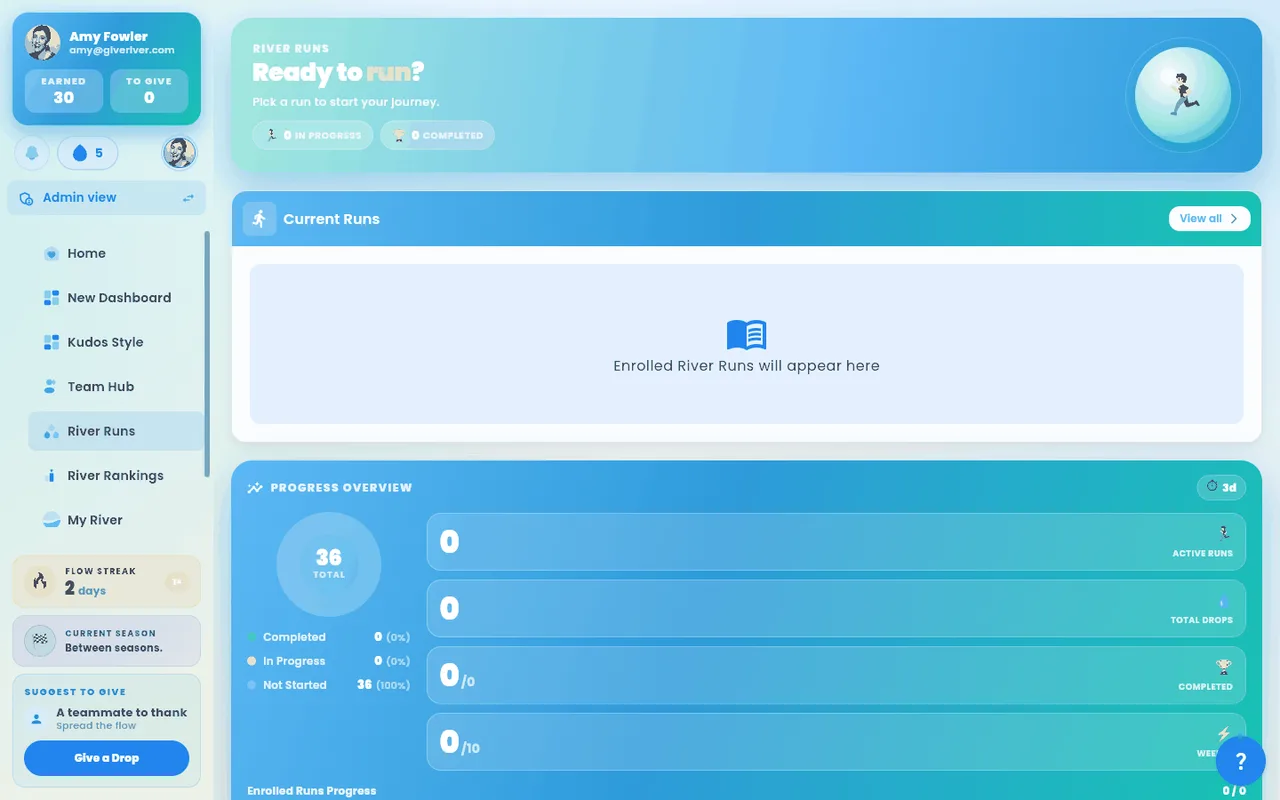
The River Runs home screen starts with a banner and four stat cards. The banner shows your Next up run with a Continue button: a required run you haven't finished (the one due soonest, marked with its Required chip) if you have one, otherwise the run you joined most recently. With nothing left to finish, it offers Browse runs. The stat cards show your River Runs streak, Runs completed, Drops earned and Minutes of streams left. Your admin picks the look of this banner for your team (see Arranging Home and Team Hub), so it may differ from the screenshots. Below it, each section appears only when it has something to show:
- Required for you — runs your admin assigned you (see Required Training)
- Current Runs — runs you are actively enrolled in. Required runs, and the run already in the banner's Next up, aren't repeated here (a required Next up run also stays in Required for you). With one run left here you get a wide Continue where you left off card; with more, a grid (a list on phones).
- Popular runs — the most-joined runs you haven't started yet
- Continue Learning — uncompleted Streams from your enrolled runs
- Completed Runs — once you've finished your first run
- Discover All Runs — runs in the library you haven't joined yet
Scroll to Discover All Runs and browse the available cards. Each card shows the run title, thumbnail, number of Streams, and Drops you can earn. You can search (the list updates as you type), filter by category, and sort the library (Newest, A–Z, Creator, or Shortest first — great for finding a quick Stream). Clear filters puts the search, category and sort back to the full library.
Two more ways to find a run:
- Ask Ugo — tap the ✨ Ask Ugo pill inside the search box, type what you're looking for (or tap Surprise me) and Ugo picks matching runs for you. Hover or long-press a picked card to see why Ugo chose it; tap Clear to return to the library. Tap Ask Ugo again to go back to keyword search.
- Request a Run — if the run you want doesn't exist yet, tap + Request a Run in the section header and describe the topic. Your suggestion goes to the Give River team and appears in your admin's action items.
Tap a run you have not yet joined. You will land on the Run Overview page.
Tap Play now to enroll in the run for free. The first Stream unlocks immediately.
After enrolling, the run appears in your Current Runs section. Tap its card to open it and begin your first Stream.
What Happens Inside a Run
Once enrolled, you navigate through Streams in order. Most runs unlock their Streams one at a time: the next Stream opens when you finish the one before it (or, if the run's creator set a timed release, a set time after that). Runs from the shared library work the same way, so each Stream unlocks when you finish the previous one. A Stream that isn't open yet shows a lock icon and Locked (or Unlocks in …); tapping it tells you what opens it. Finish a Stream and the next one unlocks right away, with no need to refresh.
Each Stream may contain:
| Content type | What you do |
|---|---|
| Video | Watch the video using the built-in player (supports YouTube, Vimeo, hosted files) |
| Audio | Listen with the in-app audio player |
| Text / Description | Read the lesson content |
| Image | View the attached image |
| Article (web link) | A card with the article's title and website. Tap Open article to read it in a new tab (in the app on a phone), then come back to finish the Stream |
| Embedded content | Interact with web content shown inside the Stream |
| Quiz | Answer questions before the Stream is marked complete. A banner shows the Drops on offer (and the bonus for reaching the pass mark, if set). Your score, Passed / Not passed, any bonus Drops, and a per-question review (your answer vs. the correct one) appear as soon as you submit, any time you reopen the Stream, and in your Journal. If you didn't reach the pass mark, tap Retry quiz to try again; your best score counts and Drops are paid once. See River Run Quizzes |
When you finish a Stream, a completion dialog gives you three choices: Journal (log it privately), Share (post to the recognition feed and earn more Drops), or Done (mark complete quietly).
Leave a Run
Joined a run that isn't for you? Open it and tap the ⋮ menu next to its title, then Leave run. A confirmation explains what happens: the run moves out of your runs, and your progress is kept. Completed Streams, quiz results and the Drops you earned stay yours, so if you join the run again you pick up where you left off.
Required runs can't be left: your organization assigned them, so the menu doesn't appear on them. See Required Training.
Key Terms
| Term | Meaning |
|---|---|
| River Run | A full course made up of multiple Streams |
| Stream | An individual lesson inside a River Run |
| Drops | Reward points earned by completing Streams |
| Drip | The scheduled release of the next Stream (set by the admin) |
| Enrolled | You have joined the run and are actively working through it |
| Completed | You have finished all Streams in a run |
Did this article help?
Related articles.
See the platform in action.
Free for up to 25 members, or try Core or Growth free for 30 days. A card is required; Free is never charged, and a trial bills when it ends unless you cancel.