River Run: Liking Streams
While working through an enrolled River Run, you can like individual Streams to signal that you found the content valuable. Likes are visible on the Stream and can be toggled on and off.
Overview
While working through an enrolled River Run, you can like individual Streams to signal that you found the content valuable. Likes are visible on the Stream and can be toggled on and off.
How to Like a Stream
- Open an enrolled River Run and navigate to any Stream (tap on a lesson in the stream list to open its content player).
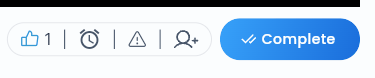
- In the action bar displayed below the Stream content, find the thumbs up icon on the left side of the bar.
- Tap the thumbs up icon to like the Stream. The icon highlights in the primary theme color to indicate an active like, and the like count next to the icon increases by 1.
- To unlike, tap the thumbs up icon again. The icon returns to the default (unfilled) color and the count decreases by 1.
Where Likes Are Shown
| Location | What is shown |
|---|---|
| Stream action bar | Thumbs up icon + current like count for that Stream |
The like count reflects all users who have liked that Stream across your organization.
Other Actions in the Stream Action Bar
The action bar at the bottom of each Stream also contains:
| Icon | Action |
|---|---|
| Thumbs up | Like / unlike this Stream |
| Alarm / bell | Set a reminder to come back to this Stream later |
| Report | Report an issue with the Stream content |
| Invite | Invite a team member to view this Stream or River Run |
Setting a Reminder
If you are not ready to complete a Stream right now, you can set a reminder:
- Tap the alarm icon in the Stream action bar.
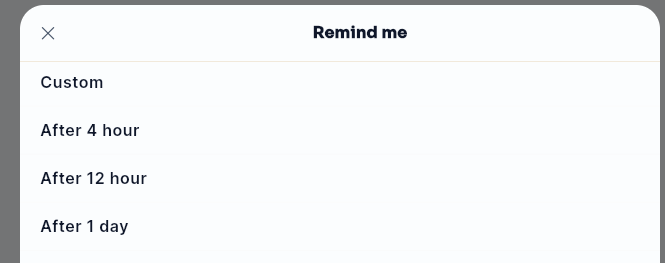
- A Remind me dialog appears with reminder options:
- Custom (opens a time picker)
- After 4 hours
- After 12 hours
- After 1 day
- Select your preferred time. A notification will remind you to return to the Stream.
Reporting a Stream
If Stream content is inaccurate, inappropriate, or has a technical issue:
- Tap the report icon in the Stream action bar.
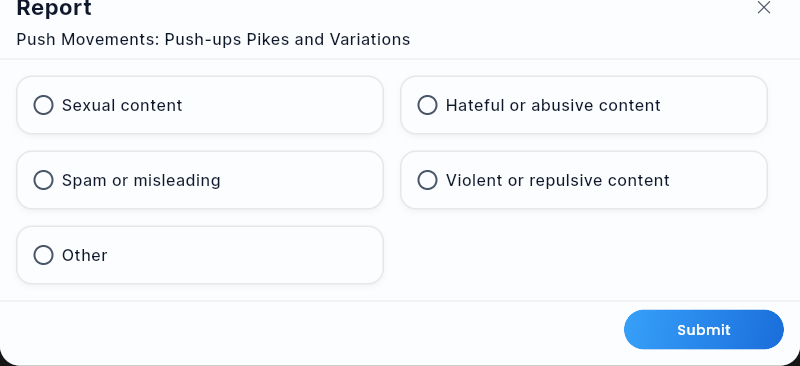
- The Report dialog opens. Select a reason: Sexual content, Hateful or abusive content, Spam or misleading, Violent or repulsive content, or Other.
- Tap Submit. The report is sent to your admin for review.
Notes
- Liking a Stream does not affect your Drops balance or progress — it is purely a content feedback signal.
- There is currently no star rating or numeric rating system for Streams or full River Runs. The like/unlike toggle is the available user-facing feedback mechanism.
Did this article help?
Related articles.
See the platform in action.
Free for up to 25 members, or try Core or Growth free for 30 days. A card is required; Free is never charged, and a trial bills when it ends unless you cancel.